0.29.x
0.29.3
- Released:
20.05.2026
This release promotes the 0.29.x pre-release series to a stable release. See the pre-release entries below for details:
🐛 Fixes
Stabilized changelog anchors for pre-release versions in the documentation.
0.29.2b1
- Released:
13.05.2026
- pre-release:
✨ New Features
Free-text filter in the Needs Index view
The VS Code Needs Index now offers a free text filter type that searches across the textual fields
id,title, andcontentof each need in one go.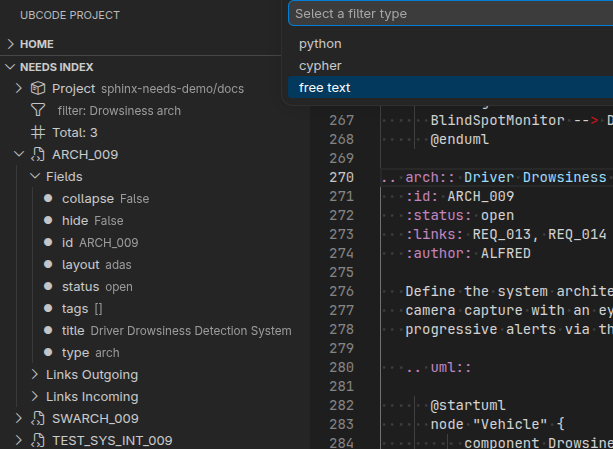
👌 Improvements
Need content available via the MCP query_needs tool
The MCP server’s
query_needstool now exposes thecontentfield alongside the other need attributes, matching theget_data_for_single_needendpoint and the build artefacts. AI assistants and other MCP clients can retrieve and filter on the directive body text directly, without a follow-up per-need lookup.Opt out of need content in build artefacts
The
ubc build needscommand gained a--no-content/--contenttoggle controlling whether the directive body text (thecontentfield introduced in 0.29.1b1) is emitted into the build artefacts. Use--no-contentto keep generated JSON / Parquet output compact when downstream tooling does not consume the body text.
0.29.1b1
- Released:
30.04.2026
- pre-release:
✨ New Features
contentfield on need itemsNeed items now carry an optional
contentfield that stores the raw body text of the directive. Content is included in JSON and Parquet exports, queryable in filter expressions (e.g."keyword" in content), returned by the MCP single-need endpoint, and checked inubc diff. Content is preserved through directive, import, and external need sources.follow_linksconfiguration for codelinks source discoveryA new
follow_linksoption in[codelinks.projects.*.source_discover]controls whether symbolic links are followed during codelinks file discovery. See codelinks configuration for more details.
👌 Improvements
Aligned codelinks file discovery behaviour with sphinx-codelinks, improving consistency between the IDE tooling and the Sphinx extension. The C/C++ recognised file extensions were updated (now
.c,.ci,.cpp,.cc,.cxx,.h,.hpp,.hxx,.hh,.ihl).
🐛 Fixes
Fixed mermaid diagram labels in the VS Code RST preview being clipped mid-word.
0.29.0b1
- Released:
23.04.2026
- pre-release:
✨ New Features
Source code traceability with codelinks
ubCode now supports tracing requirements directly in source code comments, creating a live bidirectional link between documentation and code. This implements the sphinx-codelinks marker format natively in the IDE. Embed standardised markers in C++, Python, Rust, C#, or YAML comments and ubCode extracts them into need objects automatically.
One-line need definitions let you create a new need from a single comment:
# @Function Bar, IMPL_4, impl, [SPEC_1]
def bar():
    ...
Note
Need-ID references (
@need-ids:) are not yet supported and are planned for a future release.The
.. src-trace::RST directive includes traced needs in your documentation, scoped by project, file, or directory.IDE features delivered through the language server:
Real-time diagnostics for malformed one-line markers (source:
ubcode-codelinks; codes includetoo_few_fields,too_many_fields,missing_square_brackets, etc.)Hover on markers shows a rich card with the need’s type, ID, title, metadata fields, and link targets
Find References from a source code marker navigates to all RST documents that backlink via field values or
:need:rolesAutocomplete for the
:project:option in.. src-trace::directives, populated from[codelinks.projects.*]keys inubproject.toml
Parsing is implemented in Rust (via tree-sitter) and runs incrementally — only changed files are re-parsed, keeping the feedback loop fast.
See Tracing source code with Codelinks for the full usage guide and Codelinks (source code tracing) for the configuration reference.
ubc build list-documents --codelinksCLI optionThe
ubc build list-documentscommand now supports listing files from configured codelinks projects:--codelinks/--no-codelinksto include codelinks source files,--codelinks-project <name>to filter to a specific project, and--source-documents/--no-source-documentsto toggle RST/MD source documents. These can be combined, e.g.--codelinks --no-source-documentsto list only codelinks files.Configuration redirect with
ubproject.redirect.tomlA new redirect file mechanism lets ubCode find the
ubproject.tomlfor files that live outside the documentation folder (e.g. source code files traced via codelinks). Place aubproject.redirect.tomlcontainingpath = "../docs"in your source directory and ubCode follows the redirect during its configuration file search. Circular redirects are detected and handled gracefully.See Configuration redirect with ubproject.redirect.toml for details.
👌 Improvements
Labels on diagnostic source locations
Diagnostics in the ubCode Issues panel now annotate each source location with a descriptive label (e.g. needimport-source, external-source), making it easier to understand the role of each location when a diagnostic spans multiple files, such as link constraint violations.
Expanded and reorganised the user documentation, including new configuration examples and a codelinks usage guide.