Recovering intent from code
Most projects did not start with a specification. The code exists, but the requirements and the architecture were never written down. Intent from Code recovers them from the code you have, as needs in your own documents, traced to the code, and you approve every proposal before anything is written.
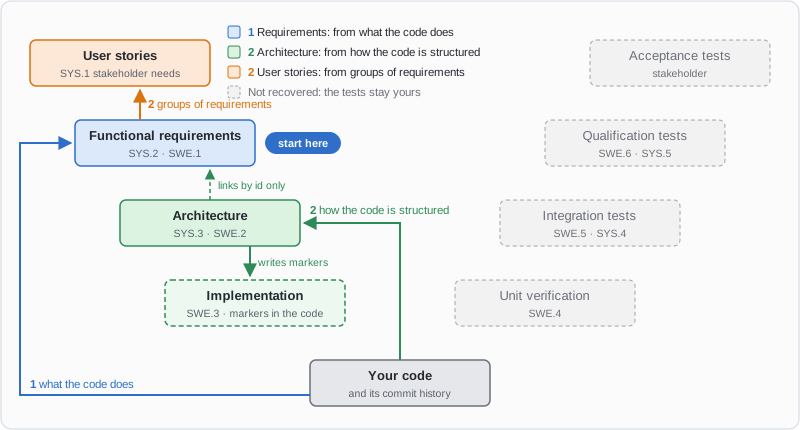
What recovery fills in on the V-model, and from what.
The three steps
Step |
Reads |
Writes |
|---|---|---|
1 · Functional requirements (start here) |
What the code does, without looking at how it is structured. |
One requirement per behaviour, each naming the source files it came from. |
2 · Architecture |
How the code is structured, one code directory at a time. |
One element per directory, linked to that directory’s requirements by id only, never by their text, and a one-line marker in each of its source files, so the code links back to its element. |
2 · User stories |
The recovered requirements. |
Stories that each group related requirements and link to them. |
After step 1, take either step 2, in either order. The right arm of the V, the tests, is not recovered: verifying what the code must do stays yours.
Every step is a proposal first. The AI agent shows you an outline of what it will write, and waits for your answer.
In VS Code
Open the Pharaoh Intent from Code view in the sidebar.
The view shows your source files as a folder tree. A hollow dot is a file not recovered yet, a green one a recovered file, and an amber one a file whose code changed after its recovery. A folder line says what its files were recovered into.
Tick the files to recover from.
Pick the stage. Each entry says what it reads and where to start.
Click Reverse. The work goes to your configured AI agent, with everything it needs.
Approve or adjust the outline the agent proposes. When it is done, the view shows the files as recovered.
The ? beside each part of the request explains it on hover, and Refresh in the view’s title bar reads everything again. When a recovered file changed in a way that leaves its intent standing, such as a reformat or the markers step 2 wrote, Accept takes the change without recovering the file again.
From the command line
The view drives the ubc agent reverse verbs, and they work the same without it:
$ ubc agent reverse sources -p docs              # what the project offers
$ ubc agent reverse plan -p docs --stage reqs    # the work order for one stage
$ ubc agent reverse prompt -p docs --stage reqs  # that work order as a prompt
$ ubc agent reverse status -p docs               # what is recovered so far
Hand the prompt to your AI agent: it names the skill to run, the targets and every rule the view would send.
The skill records its result with ubc agent reverse record.
The verbs below has the details.
What you commit
The recovered needs, in your documents.
The code markers the architecture step wrote into your source files.
The ledger under
.pharaoh/rev-eng/, which records what was recovered from what. Nothing else can recompute it, so commit it with the documents.
How it works
The flow
        sequenceDiagram
    actor You
    participant Engine as ubc agent reverse
    participant AI as AI agent
    You->>Engine: plan a stage
    Engine-->>AI: the work order
    AI->>AI: read the code
    AI-->>You: an outline
    You->>AI: approve
    AI->>AI: write the needs
    AI->>Engine: record
    You->>Engine: status
The engine plans and records, and keeps the ledger under .pharaoh/rev-eng/,
its only memory between runs. In VS Code the panel asks for the plan and hands
the work order to your agent.
The verbs report and record. They never author RST and never write into your source themselves: authoring is the AI’s job, and these verbs hand it a work order and take back what it produced.
That work order does ask for one write into your source, at one rung. When
recovery reconstructs the stage below your requirements (structure, which in
the standard ladder is architecture or design), the brief carries a marker
contract, and the recovery skill writes one codelinks
marker line into each file of the module it just recovered that the module’s codelinks project parses, at the top
of the file after any line the language needs first, such as a shebang. A marker
materialises only where a .. src-trace:: directive names its codelinks project,
so the skill authors one when no document has one yet, and never a second, which
would materialise every marker twice. Those markers are
what materialise the impl needs that link back up to the recovered element,
so without them the element sits above code the graph does not know about. The
skill proposes the file list and the ids before it writes anything and waits
for your answer. A run with no interactive user writes them and reports which
files now carry one. Set write_code_markers = false under
[agent.reverse] to switch the writes off
entirely.
-c 'agent.reverse.write_code_markers = false' does the same for one
invocation, since the reverse verbs read [agent] with the override applied.
The same override does not change which directories those verbs walk, because
the declared source roots and [source] extend_exclude are read from the
project’s own files.
The ladder decides which skill runs
Recovery climbs your own [workflow] ladder from the code stage upward (the
stage --code-stage names, else code_stage under
[agent.reverse], else code), and classifies
each rung it reaches by position, never by the name of the type it produces.
There is no check anywhere for a stage called “architecture”.
extractionThe requirement stage itself. Recovered directly from source files.
structureA need-producing stage BELOW the requirement stage, which in the standard ladder is architecture or design. Recovered from the module decomposition the ledger already holds for the requirement stage, so it needs that stage recovered first. Only a module whose recorded files include code or tests is offered, because an element binds to the code that implements it. Requirements recovered from documentation or CI workflows alone give no structure target, and the brief’s
guidancenames the sources left out. How many elements a module gets is the project’s own authoring directive to decide, together accounting for every requirement recovered from that module.synthesisA stage ABOVE the requirement stage, such as user stories. Recovered by clustering already-recovered lower needs, one cluster per module.
A stage that is not on the ladder at all reads unmapped, and its brief says
to author it by hand rather than offering a work order for it. The verification
arm is the ordinary case: recovery climbs depends_on upward and never through
dependents, so a tests stage hanging off code is never reached.
The order the stages run in
The requirement stage comes first, and the order is not a convention but what
each rung reads. The extraction rung reads source files alone, so it can run
first on an empty ledger. The structure and synthesis rungs read the ledger: a
structure element is built from the modules the requirement recovery recorded
that hold code or tests, and the requirement ids each accounts for, and a
synthesis need from clusters of already-recovered lower needs. Neither has anything to build on until the
requirement stage is recorded.
So: recover the requirement stage first. The stages below it and above it then
build on it, in either order. plan for a structure or synthesis stage over an empty
ledger returns no targets and a blocked line, and the VS Code panel shows
that line under the stage picker and will not dispatch. When the project’s
graph holds no needs of the type the input stage produces, the line names that
stage to recover first. When the graph holds some, authored in the project’s
own documents, the line counts them over the whole project and names the ledger
it read. It then says to record them with ubc agent reverse record -p and
the project directory, or to check whether another project’s ledger holds
them, and, if they were written by hand rather than recovered, to recover the
input stage first. Recovering a design stage before its requirements is not
supported in this version.
How the requirement stage is found
Three rules, in order, and the first that answers wins:
The stage
[agent.reverse] requirement_stagenames, when that stage sits on the ladder above the code stage and produces a need type. An id that names no such stage is ignored, andubc agent reverse sourcesnames it in thenoteof the stage it chose instead.A stage on the ladder above the code stage whose
producestype is spelledreqorrequirement, in any case.The nearest need-producing stage above the code stage. This is a guess, and
ubc agent reverse sourcessays so in thenoteof the stage it chose. On astory, spec, design, codeladder the guess isdesign, which is the wrong rung, and rule 1 is the fix.
Everything else is position: the stage found this way extracts, a stage below it is structure, a stage above it is synthesis.
Evidence kinds, source roots and Codelinks
Source roots say where to look. Evidence kinds say how to read. Codelinks markers provide traceability. The three are easy to conflate because they all name code, and none of them names the others.
code,tests,docs,adrsandciare evidence kinds. They are distinct from Codelinks project names, from workflow stages and from need types. Atestsclassification creates neither atestneed nor a verification link. It tells the recovery skill to read the file as a statement of expected behaviour rather than of implemented behaviour.ciis the repository’s CI pipeline and nothing else: the*.ymland*.yamlfiles directly in.github/workflows, and.gitlab-ci.yml, both at the repository root. The recovery skill reads a workflow for what the project enforces, such as the jobs that must pass, the platforms and the tool versions, which are candidate non-functional requirements. Nothing else under.githuband no other YAML file is evidence. The whole-project scope reaches these files even when the project sits indocs/, and a scope narrowed to a folder that does not hold them does not.Codelinks project names (
[codelinks.projects.<name>]) are arbitrary. A project calledtestsdoes not make its filestestsevidence, and one calledcodedoes not make themcode. Recovery reads theirsrc_dironly to know where to walk, and reads it fromubproject.tomlitself: a-coverride does not move the roots recovery walks.Classification is by path and file-name conventions plus a limited detection of inline tests. These are heuristics about the file, never test results.
Recovery reads unmarked source. It does not need a Codelinks marker in the file, and it writes none at the requirement rung. The structure rung asks the skill to place markers so the recovered element is bound back to its module, which is where traceability from code to need comes from.
        flowchart TD
    roots["source roots<br/>codelinks.projects.*.source_discover.src_dir"]
    files["source files"]
    kinds["evidence kinds<br/>code · tests · docs · adrs · ci"]
    history["history evidence<br/>commit_history · change_requests · issues"]
    skill["recovery skill"]
    needs["needs<br/>req · design · user_story"]
    markers["Codelinks markers<br/>in source, written at the structure rung"]
    roots -- "say where to look" --> files
    files -- "classified by path and name" --> kinds
    kinds -- "say how to read" --> skill
    history -- "references, resolved by a skill" --> skill
    skill -- "authors" --> needs
    needs -. "traceability" .-> markers
    markers -.-> files
Where recovery looks for code
Recovery walks the source trees the project DECLARES, and the declaration it reads is the one traceability already uses:
[codelinks.projects.code.source_discover]
src_dir = "src"
A project that declares none of these is walked from its own directory, so a
repository whose ubproject.toml sits at the root needs no configuration at
all: ubc agent install then ubc agent reverse plan reaches the code and
the tests on their own. A project in docs/ that declares none finds no code,
and its code row says which key to set.
Declaring one tree turns that fallback off. From then on only what is declared
is reached, which matters most for the layout this feature exists for: a
ubproject.toml inside docs/ with code and tests as siblings above it.
There, one entry per tree is required, and each entry needs its own name:
[codelinks.projects.code.source_discover]
src_dir = "../src"

[codelinks.projects.tests.source_discover]
src_dir = "../tests"
Declaring only the first is the easy mistake, and it is silent in the sense
that the code IS found. discovery_roots.unreached_source_count and
unreached_source_detail name the tree that was left out, on every verb that
reports discovery, and the detail carries this same key so the fix does not
have to be looked up here.
For the structure rung to write markers into ../src, the stage the markers
belong to (code in the standard ladder) must name the same directory in its
route.path, which is read from the project directory, so it is "../src"
here too. Written as route.path = "src" it names docs/src, and the brief
carries no marker contract.
The verbs
sourcesWhich recovery evidence a scope actually has, as JSON, one row per kind in this fixed order:
code,tests,docs,adrs,ci,commit_history,change_requestsandissues. The last two are available only when an installed skill declares it provides them. Each row says whether it is available and, when it is not, why. Also reports the need-producing stages above the code anchor with the kind above (the anchor is--code-stage, then[agent.reverse] code_stage, thencode, andcode_stage_noteis reported when it names no stage in[workflow]), anddiscovery_roots, which is where the walk actually looked and is the first thing to read when a scope comes back emptier than you expected, or FULLER than you expected: a project that declares onesrc_dirreaches only that tree, anddiscovery_roots.unreached_source_count/unreached_source_detailname whatever source-shaped tree sits outside it (an undeclared siblingtests/, a committedvendor/) without walking it for evidence. Zero and absent when the project declares nothing (nothing to be blind to) or when nothing outside the walk looks like source.statuscarries the samediscovery_rootsbesiderecovered_pct, so a 100% coverage read is never mistaken for “the whole project”, and the unreached count never joinsrecovered_pct’s own denominator: an undeclared tree is reported, not silently counted as uncoverable.planThe work order for ONE stage over one scope. Reports the
skillto run, thetargetsto run it on, the stage’sroute_path, and theknown_streamsthe graph already uses.route_patharrives with its{stream}placeholder intact. A stream is the folder under the route that holds one functional area’s needs. Which stream a piece of code belongs to is a judgement about what the code is for, and the engine does not make it. The skill chooses one per target, so a run can name several, authors there, and hands each concrete path back torecord.These keys carry what varies from project to project, so no recovery skill has to hard-code it:
produces, the need type the stage authors.id_prefix, the prefix that type’s ids start with.default_status, your lifecycle’s first state.authoring, the stage’s own directive. It decides how many needs the run authors, what they cover and what shape they take, and it is where a project asks for a diagram.diagram_format, the syntax to author that diagram in.author_skill, the skill a FORWARD run at this stage would use. The recovery run reads it for the output shape only and never runs it.author_skill_path, where that skill is installed. It is absent when the skill is not installed, and the run then does not search for it.
Each is omitted when your config declares it nowhere, and an omitted
default_statusmeansdraft, which is the same readingubc agent nextdocuments for the same key on the forward side.With no
--source, targets are auto-populated and a source already recorded in the ledger is left out, so a second pass over a partly-recovered scope does not re-extract what it already has. Naming--sourceexplicitly overrides that, because naming a file is a statement of intent about that file. A file is named relative to the repository root, or as an absolute path inside the repository, which is keyed exactly as the relative spelling is. A module on a structure stage can be named by an absolute path the same way.At the
structurerung, that skip is keyed on the shard’s existence, not on whether the recovered element still covers the module: a module that grew since its recovery is not re-offered, and its recovered element is not extended. To recover it again, runforget --source structure:<module>, delete any marker lines the earlier run wrote into the module’s files (a run writes them only where its target carried acode_marker), and runplanagain. The recovered element’s RST survivesforget, so it is yours to keep or remove. Requirements that the module’s new code should have reached still show up as intent gaps instatus.Read
blockedbefore anything else. A brief with no targets exits0either way, so it is the only field that separates “everything here is already recovered” from “the configuredsrc_dirdoes not exist” from “the stage below this one is not recovered yet”. When set it carries the diagnostic naming the key or the stage at fault. The VS Code panel refuses to dispatch a blocked brief and shows this text.promptThe work order
planbuilds, rendered into the prompt a recovery run is dispatched with: the skill to run, the targets, theubcand-pto use, what to author and where, the marker contract, the commit references, and how to record the result. It takes the same flags asplan, and the view sends exactly this prompt.--evidence KIND(repeatable) is the evidence you choose for the run. A commit reference is resolved only when its own kind is chosen, and the run lists only the chosen kinds as its sources.--intent-context TEXTadds your own context as a section of its own.--headlesstells the run that nobody is there to answer, so it decides and reports instead of waiting for an approval.--work-order-file FILEtakes the target list when it is too long to inline, and the prompt points at the file.--jsonprints{brief, prompt, work_order_file}instead of the text.
recordThe only writer of the
.pharaoh/rev-eng/ledger, and the one verb here that changes anything. It takes one JSON payload through--input <FILE>. Runubc agent reverse record --schemafor the contract, which is the authority rather than this page.Two coordinates meet in that payload and they are not the same one.
source_pathis measured from the repository root, because it is both the ledger’s key and a git pathspec.target_rstis measured from the project directory, the one holdingubproject.toml. On a project nested below the repository root the correct pair looks mismatched and is not.target_rstnames the document the recovery skill already authored, so it has to exist in the projectrecordresolved. Atarget_rstnaming no file there is refused: the document most likely sits in another project (for example one whoseubproject.tomlis below the directory you passed), and-pshould name that project instead.source_pathaccepts a file, a directory (a multi-file recovery unit, whosemembersyou pass back from the target rather than listing off disk), or a MARKER naming no file:cluster:plus a cluster key for a synthesis stage,structure:plus a module for a structure stage, orcommits:plus a range. A marker is what keeps two rungs’ records of the same module apart, so pass a target’ssource_pathback unchanged, prefix and all.retiredis an optional list of need ids the record replaces and which no longer exist, used after a split: the atoms are recorded under the shard that held the original id, withretirednaming it, and the engine drops it from that shard. Without it the shard keeps an id that resolves nowhere andstatusreports the unit’s files asorphaned. An id listed in bothneedsandretiredis refused, and a retired id the shard does not hold is reported as a warning.A file the recovery finds nothing in cannot be recorded, because
recordrefuses an emptyneeds.plantherefore keeps offering that file and it stays uncovered. Exclude such files with[source] extend_excludeso they stop being offered.statusThe combined ledger, graph and git view for a scope: how much is recovered, each node’s state, needs that drifted from what was recorded, and the intent gaps still open.
recovered_pctis precision only, counted in files.Two fields report work the run did not act on, and neither is an error.
unreadable_shardsnames shards that could not be parsed.out_of_scope_shardsnames shards that parsed perfectly and hold real needs, but whose source no discovery root reaches: they count toward neither half ofrecovered_pctand appear on no node. The fix for the first is a re-recording, the fix for the second is asrc_diredit.forgetDelete the one ledger shard recorded for
--source. It never touches RST, so the needs a recovery authored survive it. Use it to re-run a recovery over a source from scratch.rebaselineubc agent reverse rebaseline PATH...accepts the current content of the named source files as the recovered one, so theirsource_driftreadsunchangedagain. Use it after you reviewed a change that does not touch the recovered intent: codelinks marker lines written into the file, or a reformat. A path is repository-relative (asstatusnames its nodes) or absolute inside the repository, and the project flags are those ofrecord.Every shard covering a path gets that file’s hash reset: the shard itself for a per-file recovery, only the named member for a multi-file unit. The recovered needs, their baselines, the RST and the source are not touched. It prints one JSON object,
{"rebaselined": [{"path", "shard_path"}], "skipped": [{"path",
"reason"}]}
. A path no shard covers, or a file that cannot be read, isskippedwith areasonand is not an error. The exit code is 1 only for a failure: no project, an unreadable or newer-than-supported ledger, or a path outside the repository.It accepts a change, it does not review it. A real edit to the recovered behaviour still deserves a re-recovery (
forget, thenplanagain).
sources, plan, prompt and status first check that the project’s config loads,
[agent] included, and stop with exit code 3 and the config’s own error when it does not,
so a caller can tell a broken config from a failed run.
The language server reports such a config when it loads it,
so the Intent from Code panel does not repeat it in the panel.
What is committed, in detail
.pharaoh/rev-eng/ is the reverse-recovery ledger: one shard per recovered
source, recording which needs a recovery run produced and from what. It follows
the same rule as the rest of .pharaoh/: commit
it, because nothing can recompute what a recovery run produced.
Machine-local files inside it are the exception. A write lock is not a durable
record, so the engine gitignores it itself the first time anything writes to
the ledger, in a .pharaoh/rev-eng/.gitignore it creates once and never
rewrites.
Recording a shard freezes a hash of the source’s content. Changing the source
afterwards does not re-trigger or invalidate anything by itself: status
re-hashes the file and reports the comparison per node as source_drift,
either unchanged, changed, or unmeasured with a reason.
The anchor is content rather than a commit id on purpose. A rebase, a squash or
an amend gives byte-identical code a new commit id, so a recorded id routinely
names a commit that no longer exists, and a measurement anchored on one has no
answer to give. Reporting that as a missing field is worse than useless: a
reader takes the silence for “nothing changed”. Content survives every history
rewrite, and where a comparison genuinely cannot be made, unmeasured says
so and reason says why.
Caution
Recovery is review-and-accept. Everything these verbs produce is a candidate for a person to confirm or correct, never committed truth. The review arm (Reviews and quality analysis) is how it stops being one.
A recovered need opens in the SAME status a hand-authored one opens in: your
[workflow.lifecycle]’s first declared state, or draft when you declare
no lifecycle. There is no recovered-only status, because that would be a state
your own lifecycle never declared and every recovered need would land with a
status_undeclared gap already against it. What marks a need as recovered
is its .pharaoh/rev-eng/ ledger entry, which status reads and reports.