Need views
A view directive selects needs from the project’s index and presents them:
as a table, a list, copies of their cards, a diagram, a chart, or a report.
ubCode draws every view on this page in the editor preview and in its html and pdf builds,
from the same index a Sphinx-Needs build would read.
The diagrams and charts are ubCode’s own drawings rather than a Sphinx-Needs build’s images,
so they are laid out differently;
the view differences list where the two part company.
Most views select their needs with the same four options:
:tags:, :types: and :status: each take a comma-separated list,
and :filter: takes an expression over the needs’ fields, such as status == "open".
The views here select :tags: ex-views, which only the specimen needs below carry,
or name those needs by id,
so they show the specimen needs and no others.
The specimen needs
Six needs for the views to show: two requirements, the specification of each,
an implementation and its test.
Each later one links to the one it refines or covers,
and each carries the duration a Gantt chart reads and, all but the test, a completion.
The needs the views show
.. req:: Import a CSV file
   :id: EX_REQ_VIEWS_1
   :status: done
   :tags: ex-views
   :duration: 2
   :completion: 100

   A user can load records from a CSV file.

.. req:: Export a PDF report
   :id: EX_REQ_VIEWS_2
   :status: open
   :tags: ex-views
   :duration: 3
   :completion: 20

   A user can save the report as a PDF file.

.. spec:: Read the header row
   :id: EX_SPEC_VIEWS_1
   :status: done
   :tags: ex-views
   :links: EX_REQ_VIEWS_1
   :duration: 2
   :completion: 100

   The first row names the columns.

.. spec:: Lay out the pages
   :id: EX_SPEC_VIEWS_2
   :status: open
   :tags: ex-views
   :links: EX_REQ_VIEWS_2
   :duration: 4
   :completion: 50

   Each page holds a header, the records, and a page number.

.. impl:: CSV reader
   :id: EX_IMPL_VIEWS_1
   :status: done
   :tags: ex-views
   :links: EX_SPEC_VIEWS_1
   :duration: 3
   :completion: 100

   Reads the header row, then one record per row.

.. test:: CSV reader test
   :id: EX_TEST_VIEWS_1
   :status: open
   :tags: ex-views
   :links: EX_IMPL_VIEWS_1
   :duration: 1

   Reads a two-record file and compares the records.
A user can load records from a CSV file. |
A user can save the report as a PDF file. |
The first row names the columns. |
Each page holds a header, the records, and a page number. |
Reads the header row, then one record per row. |
Reads a two-record file and compares the records. |
```{req} Import a CSV file
:id: EX_REQ_VIEWS_1
:status: done
:tags: ex-views
:duration: 2
:completion: 100

A user can load records from a CSV file.
```
The other five are written the same way. A need id is unique in the project, so the MyST views on the MyST page show these same six needs.
duration and completion are fields these docs declare under needs.fields,
with a description and an integer schema and nothing more:
a Sphinx build adds both to every project itself,
while ubCode reads only the fields a project declares
(see the Gantt chart differences).
Note
A card lists the need’s fields in alphabetical order,
where a Sphinx-Needs build lists status and tags first and then the fields in the order they are declared
(see the need-card differences).
Tables
needtable draws the selected needs as a table, one row per need.
A needs table
.. needtable:: The view specimens
   :tags: ex-views
   :columns: id, title, status, links as "Links to"
   :sort: title
   :style: datatables
   :page_size: 5
ID |
Title |
Status |
Links to |
|---|---|---|---|
CSV reader |
done |
||
CSV reader test |
open |
||
Export a PDF report |
open |
||
Import a CSV file |
done |
||
Lay out the pages |
open |
||
Read the header row |
done |
```{needtable} The view specimens
:tags: ex-views
:columns: id, title, status, links as "Links to"
:sort: title
:style: datatables
:page_size: 5
```
The MyST form renders live in the MyST needs table.
:columns:The columns, in order, separated by
,or;. A column is a field or link name, headed by its name in title case (idis headedID);name as "Heading"gives a heading of your own.:sort:The field the rows are sorted by; unset, they are sorted by id.
:style:datatables, the default, makes the table interactive in a web page: the reader sorts and filters the rows and pages through them.tabledraws a plain table.:page_size:The rows on each page of an interactive table.
Note
The PDF prints the table as a plain table, every row on it.
Lists
needlist lists the selected needs, each as its id and title, linked to its card.
A needs list
.. needlist::
   :tags: ex-views
   :status: open
   :show_status:
   :sort_by: id
```{needlist}
:tags: ex-views
:status: open
:show_status:
:sort_by: id
```
The MyST form renders live in the MyST needs list.
:show_status:and:show_tags:Add each need’s status, or its tags, after its title.
:sort_by:The field the list is sorted by. Unset, ubCode lists the needs in id order and a Sphinx-Needs build in the order they were written (see the needs list differences).
Extracts
needextract draws the card of each need it selects again, where it stands:
its argument names one need by id, or :filter: selects several.
The copy is a view of the need, not a second need.
An extract
.. needextract:: EX_REQ_VIEWS_2
A user can save the report as a PDF file. |
```{needextract} EX_REQ_VIEWS_2
```
The MyST form renders live in the MyST extract.
:layout: and :style: draw every card the extract shows with that design or those styles,
as they would on the need itself
(see the extract differences).
Flow diagrams
needflow draws the selected needs as boxes, and the links between them as arrows.
A flow diagram
.. needflow::
   :tags: ex-views
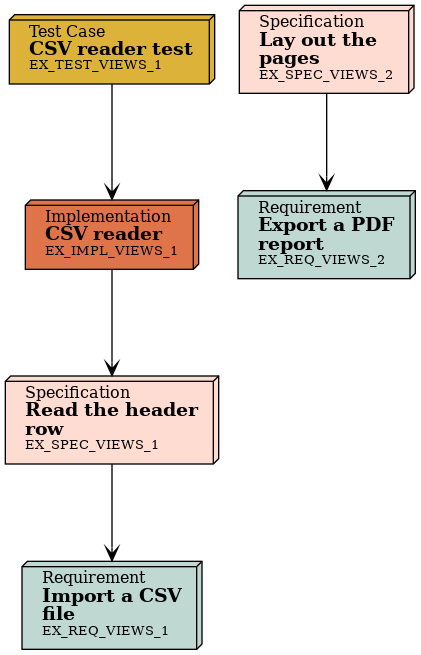
```{needflow}
:tags: ex-views
```
The MyST form renders live in the MyST flow diagram.
:root_id:Starts the diagram at one need and draws the needs linked to it, in either direction (
:root_direction:narrows that tooutgoingorincoming);:root_depth:bounds how far.:link_types:The link types drawn; unset, every link type.
Note
ubCode draws the diagram with Mermaid in the editor preview and in its html build,
and with PlantUML in its pdf build here,
where these docs’ Sphinx build draws it with Graphviz,
so the three lay it out differently
(see the flow diagram differences).
Sequence diagrams
needsequence walks the links from its :start: need.
The needs the start need links to are the messages,
drawn as arrows labelled with their titles,
and the needs each message links to receive them.
Here the implementation sends Read the header row to the requirement that specification refines.
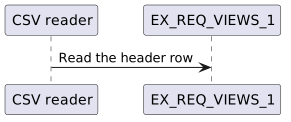
```{needsequence} The CSV reader
:start: EX_IMPL_VIEWS_1
```
The MyST form renders live in the MyST sequence diagram.
:start:The need, or comma-separated needs, the walk starts from.
:link_types:The link types the walk follows; unset,
linksonly.
Note
A Sphinx-Needs build labels a need that only receives messages with its id, EX_REQ_VIEWS_1, where ubCode labels every need with its title (see the sequence diagram differences).
Pie charts
needpie draws one slice per line of its content:
each line is a filter, and its slice is the number of needs it matches.
:tags:, :types:, :status: and :filter: narrow the needs every line counts.
A pie chart
.. needpie:: Needs by status
   :tags: ex-views
   :labels: open, done
   :colors: #DCB239, #BFD8D2
   :legend:

   status == "open"
   status == "done"
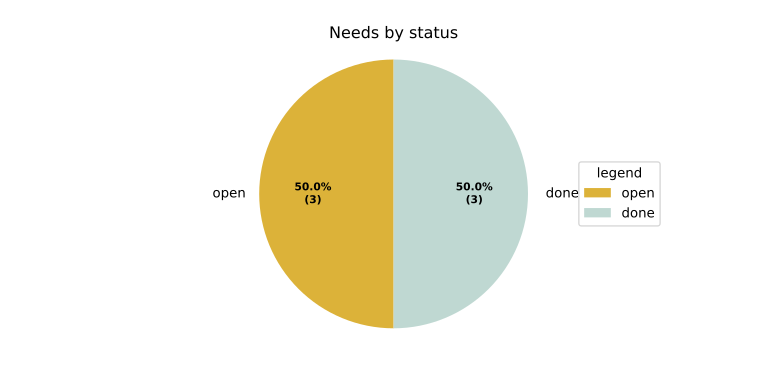
```{needpie} Needs by status
:tags: ex-views
:labels: open, done
:colors: "#DCB239, #BFD8D2"
:legend:

status == "open"
status == "done"
```
The MyST form renders live in
the MyST pie chart.
In MyST the :colors: value is quoted: unquoted, a value starting with # is read as a comment.
:labels:and:colors:Name and colour the slices, in the order of the lines.
:legend:Adds a legend.
Bar charts
needbar draws a grid of filters as bars:
each content line is a row of filters separated by ,,
each row a series, and each filter a bar counting the needs it matches.
:xlabels: names the columns and :ylabels: the rows.
A bar chart
.. needbar:: Needs by type and status
   :tags: ex-views
   :xlabels: Requirements, Specifications
   :ylabels: open, done
   :legend:

   type == "req" and status == "open", type == "spec" and status == "open"
   type == "req" and status == "done", type == "spec" and status == "done"
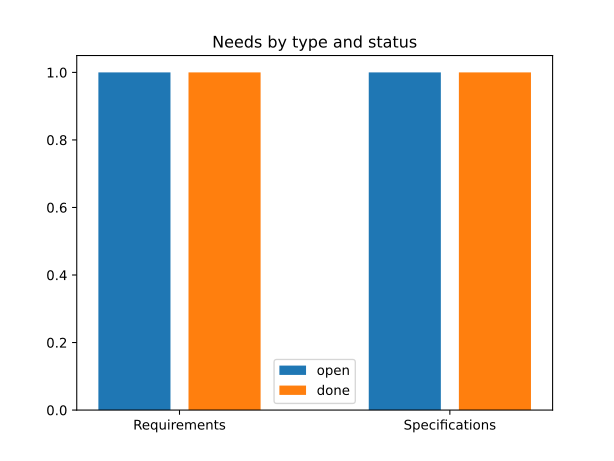
```{needbar} Needs by type and status
:tags: ex-views
:xlabels: Requirements, Specifications
:ylabels: open, done
:legend:

type == "req" and status == "open", type == "spec" and status == "open"
type == "req" and status == "done", type == "spec" and status == "done"
```
The MyST form renders live in the MyST bar chart.
:stacked:Stacks each column’s bars instead of setting them side by side.
:horizontal:Draws the bars across rather than up.
Note
Name the columns and rows with :xlabels: and :ylabels::
a first content line of names, without :xlabels: FROM_DATA,
is read as a row of filters by both ubCode and a Sphinx-Needs build.
Gantt charts
needgantt draws each selected need as a task:
its duration field is the task’s length in days,
its completion field the per cent of it done,
and a link makes the need start after the need it links to has ended.
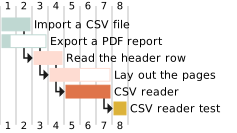
```{needgantt} The import and export plan
:tags: ex-views
```
The MyST form renders live in the MyST Gantt chart.
:duration_option:and:completion_option:Name other fields to read the length and the completion from.
:starts_after_links:,:starts_with_links:and:ends_with_links:The link types that start a task after, or with, the need it links to, or end it with that need;
:starts_after_links:islinksunless set.
UML diagrams
needuml draws a PlantUML diagram whose body is a template over the project’s needs:
{{flow("ID")}} draws a need as a box, and the rest is PlantUML.
needarch is the same directive written inside a need,
where need() is that need.
A UML diagram and an architecture diagram
.. needuml::

   {{flow("EX_IMPL_VIEWS_1")}}
   {{flow("EX_REQ_VIEWS_1")}}
   EX_IMPL_VIEWS_1 --> EX_REQ_VIEWS_1

.. impl:: PDF writer
   :id: EX_IMPL_VIEWS_ARCH
   :status: open

   .. needarch::

      {{flow(need().id)}}
      {{flow("EX_SPEC_VIEWS_2")}}
      {{need().id}} --> EX_SPEC_VIEWS_2
|
```{needuml}
{{flow("EX_IMPL_VIEWS_1")}}
{{flow("EX_REQ_VIEWS_1")}}
EX_IMPL_VIEWS_1 --> EX_REQ_VIEWS_1
```

````{impl} PDF writer
:id: EX_IMPL_VIEWS_MYST_ARCH
:status: open

```{needarch}
{{flow(need().id)}}
{{flow("EX_SPEC_VIEWS_2")}}
{{need().id}} --> EX_SPEC_VIEWS_2
```
````
The MyST form renders live in the MyST UML diagrams.
Note
ubCode turns the PlantUML into a Mermaid diagram in the editor preview and in its html build,
and draws it with PlantUML in its pdf build here, as a Sphinx build does
(see the UML diagram differences).
Reports
needreport reports the project’s own vocabulary rather than its needs:
:types: lists the need types, :links: the link types,
:options: the fields, and :usage: counts the needs of each type.
Each section is a dropdown.
A report
.. needreport::
   :links:
Need Links
NAME |
INCOMING |
OUTGOING |
COPY |
ALLOW DEAD LINKS |
|---|---|---|---|---|
Dr_supports |
Supported by |
Supports |
False |
False |
Links |
Links incoming |
Links outgoing |
False |
False |
Parent_needs |
Child needs |
Parent needs |
False |
False |
```{needreport}
:links:
```
The MyST form is shown as source only (see the note below).
Note
In a MyST document ubCode draws the report,
where a Sphinx build reports Directive 'needreport' cannot be mocked and draws nothing
(see the report differences).
:template: names a Jinja template that renders the report instead,
from a path relative to the document;
ubCode reads it only from inside the project’s source directory
(see the report differences).
Linking to a view
The view directives that accept :name: — needflow and needgantt —
register the name as a stable cross-reference target,
so another page can :ref: straight to that chart
(a Sphinx-Needs build takes the option on needflow only):
.. needflow:: Delivery plan
   :name: delivery-plan

..  and, from anywhere in the project:

See the :ref:`delivery-plan` chart.
In a built site the name becomes an id on the view
(normalised the usual way — Delivery Plan becomes delivery-plan),
with a ¶ permalink in the caption when the view renders one.
A view with no :name: gets no anchor and no permalink,
and ubCode never mints the positional id a Sphinx-Needs build does.
Two edges are worth knowing before you rely on it:
A name whose slug is empty still anchors — but not readably. By default (
[parse] id_style = "github") a name in any script keeps its letters (:name: 交付计划anchors at#交付计划), so only a name of punctuation or emoji slugs to nothing. Underid_style = "docutils"the slug drops everything that is not an ASCII letter or digit, so a name written in a non-Latin script slugs to nothing too. The view then takes the page’s sharedid1/id2counter instead, exactly as a Sphinx build does, and:ref:reaches it. What you lose is the readable URL:#id1says nothing about what it points at, and it moves if you add another such element earlier on the page. So name the viewdelivery-planand write the display text you want::ref:`交付计划 <delivery-plan>`.A
needflowshows its caption only when it draws a diagram, so a named one whose filter matched nothing keeps itsidbut shows no¶. Aneedganttdraws its caption in every state, so its¶is always there.
See Anchors on views and diagrams for the whole rule.